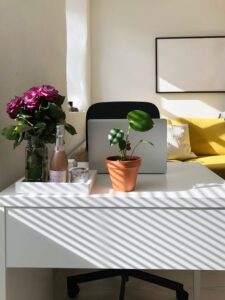
Tips for Creating a Cozy and Productive Home Office Space
Creating a home office that balances coziness and productivity can make a significant difference in your daily work routine. Whether you work remotely full-time or occasionally need a quiet place to focus, your workspace should inspire creativity and comfort. Below are practical tips to help you build a home office environment that feels welcoming and keeps you motivated.
1. Choose the Right Location
The first step in setting up your home office is selecting a suitable spot. Ideally, pick a space with minimal distractions, natural light, and enough room for your furniture and equipment.
– Quiet corners or spare rooms: These areas reduce noise and interruptions.
– Near a window: Natural light can improve mood and reduce eye strain.
– Avoid high traffic zones: Places like the kitchen or living room may be noisy or crowded during the day.
2. Invest in Comfortable Furniture
Comfort is key to maintaining focus and avoiding physical strain.
– Ergonomic chair: A good chair supports your posture and reduces back pain.
– Adjustable desk: Consider a desk that can switch between sitting and standing positions.
– Proper desk size: Make sure your desk can accommodate your computer, documents, and other essentials without feeling cluttered.
3. Optimize Lighting
Lighting plays a crucial role in productivity and ambiance.
– Use layered lighting: Combine overhead lights with task lighting such as a desk lamp.
– Choose warm bulbs: Soft, warm light creates a cozy atmosphere.
– Position your desk to avoid glare: Place monitors perpendicular to windows to minimize reflections.
4. Personalize Your Space
A workspace decorated with your personality can boost motivation.
– Add plants: Greenery improves air quality and adds a natural touch.
– Display inspiring items: Photos, artwork, or quotes that encourage you.
– Use calming colors: Blues, greens, and neutrals are known for their soothing effects.
5. Keep Your Workspace Organized
A tidy space helps clear your mind and improves efficiency.
– Use storage solutions: Shelves, drawer organizers, and filing cabinets keep items in place.
– Declutter regularly: Set aside time weekly to remove unnecessary papers and items.
– Use cable management tools: Keep cords neat to prevent tangles and distractions.
6. Incorporate Technology Wisely
Technology should streamline your work, not complicate it.
– Reliable internet: Ensure your connection supports video calls and online tasks.
– Quality peripherals: Invest in a good keyboard, mouse, and headset.
– Reduce screen time: Use breaks to rest your eyes and stretch your body.
7. Implement Boundaries Between Work and Rest
Separating work time from personal time helps maintain balance.
– Set specific work hours: Inform household members of your schedule.
– Designate a work-only area: Avoid working where you relax, like your bed or couch.
– Take breaks: Short, regular breaks improve focus and reduce fatigue.
8. Add Comfort Elements
Small touches can make your home office feel cozy and inviting.
– Soft textiles: Use cushions, throws, or rugs for warmth and texture.
– Temperature control: Ensure the room is well-ventilated and at a comfortable temperature.
– Background sounds: Play gentle music or use a white noise machine if it helps concentration.
Final Thoughts
Designing a home office that is both cozy and productive doesn’t have to be complicated. By focusing on comfort, lighting, organization, and personalization, you can create a space that supports your work needs and wellbeing. Take the time to adjust your setup as needed, and you’ll enjoy a more enjoyable and effective work-from-home experience.